Income and Employment Verification Confirms Applicant Payroll and Employer Data Inside Salesforce
Instant Employment and Income Checks in Salesforce
With Plaid connected to Salesforce, checking customer’s employment or income becomes quick and straightforward. You can verify income, confirm employment history, and complete employment verification without chasing paperwork or waiting on slow manual reviews.
Direct Payroll Verification Pulls Income, Hours, and Employer Details Straight From Payroll Accounts
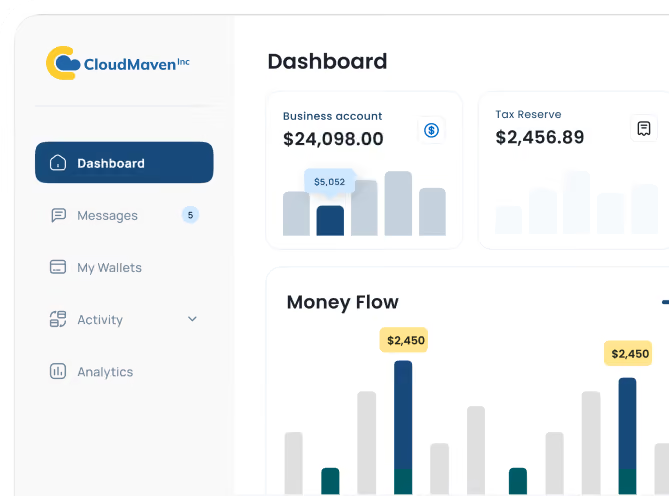
When someone connects their payroll account, you get real numbers straight from the source; no guessing, no waiting for documents that may or may not arrive. Covering 86% of the US population, it is the easiest way to see verified income, job status, and work history without extra steps. Everything shows up clearly in Salesforce so your team isn’t stuck re-checking details or calling employers.

-p-1080%201.avif)
Bank Deposit Analysis Verifies Income for Gig Workers, Freelancers, and Non-W2 Earners
Some people don’t have traditional payroll accounts, and that’s okay. With Plaid, you can look at actual bank deposits to understand someone’s income without asking them to dig up statements. It’s especially helpful for gig workers, freelancers, or anyone with multiple income streams. You get a clear picture of what’s coming in and how often right inside Salesforce.
Income Verification Requests Launch From Any Salesforce Object, Including Leads, Contacts, and Accounts
No matter where your team starts their process, from loan Application, Lead, Contact, or anything, you can kick off income or employment checks from that exact record. There’s no hopping between screens or creating awkward workarounds. Everything stays in one place, so the workflow actually feels simple.
Completed Verifications Populate Salesforce Fields With Verified Income and Employer Data
Once someone completes their verification, the data drops into Salesforce automatically, no copy-pasting, no double-checking spreadsheets, no “Did we get the right numbers?” moments. Your team gets clean, verified info right where they need it, which cuts down on delays and helps decisions move faster.
Document Upload Extracts Income and Employer Details From Paystubs While Flagging Tampering
Sometimes people just want to upload a paystub or W-2. They drop the file in, and Plaid does the heavy lifting in the background. It pulls out the important details, checks for signs of tampering, and sends the clean data straight into Salesforce. Your team gets what they need without combing through PDFs or wondering if something looks “off.”
Real-Time Income and Employment Checks Cut Approval Time by 74% and Cost by 43%

Approval Time Drops by Roughly 74% With Real-Time Payroll and Employment Checks
With real-time salary and job checks, you move from days of manual review to decisions in minutes.

Operational Cost Falls by About 43% When Manual Document Chasing Ends
Automating income and employment checks means less staff time spent chasing documents and verifying manually.

Fraud-Flag Incidents Decline by Roughly 67% With Source-Level Payroll and Bank Data
Pulling data directly from payroll and bank sources uncovers misleading info far faster than traditional document reviews.

Applicant Abandonment Decreases by Nearly 58% When Verification Finishes in Minutes
A smoother, faster verification experience means fewer people drop out halfway through the process.
Why Teams Choose Cloud Maven, Inc to Verify Income and Employment Inside Salesforce


Applicants Finish Income and Employment Checks in Minutes, Not Days
People can verify income or employment in minutes, so your team isn’t emailing reminders or waiting on half-finished applications to trickle in.

Verification Volume Scales From 10 Applications to 10,000 Without a Backlog
Whether you’re processing 10 applications or 10,000, the workload doesn’t pile up. The verification flow stays fast, steady, predictable.

Plaid and Verified Documents Supply Every Income and Employer Figure
You’re not guessing anymore. Every number comes from Plaid or verified documents, so decisions feel solid rather than “let’s hope this looks right.”

Verified Financial Data Surfaces Strong Applicants and Flags Risk Sooner
Your team gets a clearer picture of someone’s financial situation, which helps you spot strong candidates faster and flag issues without combing through documents.

The Applicant Flow Removes Portal Logins and Old Paystub Searches
Applicants don’t need to hunt down old paystubs or log into random portals. The whole process feels quick, familiar, and far less intrusive.

New Users Learn the Verification Workflow Without Formal Training
Everything is simple to understand, easy to click through, and designed so your team can get up to speed instantly.

Frequently Asked Questions
How accurate is the income and employment verification?
Plaid pulls data straight from payroll accounts or bank deposits, so the numbers are about as close to “source of truth” as you can get. When someone can’t connect a payroll system, the document upload option adds another layer of accuracy by scanning for edits or signs of manipulation. All of this makes income verification and employment verification far more reliable than relying on PDFs people email in.
What if applicants don’t have traditional payroll accounts?
Not everyone uses ADP or Gusto. In those cases, the system verifies income using bank deposits or lets them upload a paystub or W-2 instead.
Here’s how it helps:
- Bank connection captures recurring income for freelancers or gig workers
- Document upload covers anyone who can’t connect a bank or payroll app
- Your team still gets clean, usable data for employment history verification or verify income checks
Do we need any special Salesforce setup to use this?
No complicated steps. Most teams connect it in under an hour. You can start employment verification or income verification from any Salesforce object like Leads, Contacts, Loans, whatever fits your workflow. The data flows back into your records automatically, so you don’t need custom integrations or heavy admin work. If you ever want to tweak where or how the verification shows up, that’s just a quick configuration change, not a whole rebuild.
Is my applicant’s data secure when we verify employment or income?
Yes. Everything runs through Plaid, which means bank-level security, encrypted connections, and user consent at every step. No one’s payroll login or bank password ever touches Salesforce or your system. The only thing passed back is the verified employment or income data. So whether you are doing employer verification or checking income streams, the sensitive details stay protected and out of places they don’t belong.
What happens if someone refuses to connect their payroll or bank?
People sometimes prefer not to link accounts, so they can upload a paystub, W-2, or bank statement instead. Plaid scans the document, extracts the income and employer details, and flags anything that looks edited. This still gives you dependable employment verification services without slowing the application down. The flow stays smooth, and your team gets the info they need without chasing the applicant for days.
Learn. Build. Grow.
August 24, 2026
August 17, 2026
August 10, 2026