
Keep QuickBooks and AWS S3 Data Connected and Synced in Salesforce
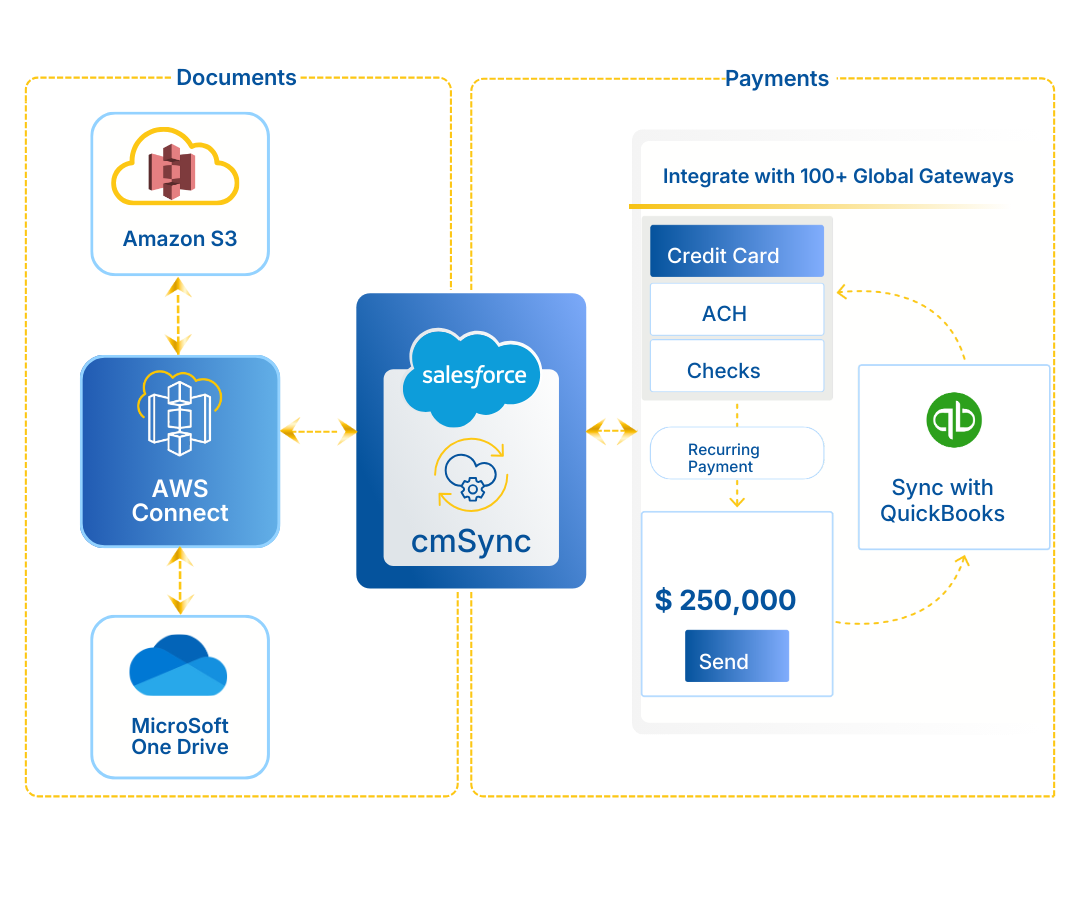
cmSync connects Salesforce with QuickBooks Online for two-way financial data sync and with Amazon S3 for secure, scalable file storage. Teams eliminate manual reconciliation, reduce data entry errors, and keep large files accessible from Salesforce records without hitting storage limits.

How cmSync Improves Data Accuracy, Storage Efficiency, and Compliance

Unified Financial and Document Data
Syncing CRM and accounting ensures every department works with accurate, up-to-date records; no duplicates, no mismatches, no confusion. Teams can sync customers, invoices, payments, and related financial records between Salesforce and connected systems while reducing manual reconciliation steps and duplicate data entry across departments.

Scalable, Cost-Efficient Storage and Backup
With AWS S3 sync, file storage scales as you grow; large archives don’t slow Salesforce down and you pay only for what you use. Securely archive contracts, invoices, borrower files, and historical documents in scalable cloud storage while reducing Salesforce storage usage and maintaining direct access from Salesforce.

Reliable Continuity and Compliance Readiness
Cloud-backed storage adds durability, security, and audit-friendly backup, protecting sensitive data and ensuring compliance even as volume and complexity increase. AWS S3-backed storage supports encrypted retention, disaster recovery readiness, and compliance initiatives aligned with HIPAA, SOC 2, GDPR, PCI, and internal data governance policies.
The Two Apps That Power cmSync

Sync customers, invoices, and payments in real time with two-way QuickBooks. Automatically keep financial and CRM records aligned between Salesforce and QuickBooks Online without relying on spreadsheets or manual updates.

Securely sync files and data between Salesforce and AWS in real time. Offload large documents, historical records, and attachments to AWS S3 storage without slowing down Salesforce performance or increasing storage costs.
Why Finance and IT Teams Choose cmSync for Data Sync

Uncluttered Salesforce That Stay Fast Over Time
By shifting large documents to S3 automatically, Salesforce stays lean, responsive, and easier to maintain even as teams grow and file volume explodes. IT teams can better manage Salesforce storage quotas and reduce performance issues caused by years of accumulated attachments and archived files.

Real-Time Visibility
Teams always see the latest financial data and file updates without checking multiple systems or waiting on sync. Finance teams can review invoice payments, customer balances, and reconciliation updates in real time, while IT teams maintain visibility into synced files and storage activity across connected systems.

Financial Accuracy That Protects Downstream Decisions
Clean, current QuickBooks sync means forecasts, approvals, and customer decisions rely on real numbers, not stale exports or reconciliations done days later. Finance teams can streamline month-end close processes, reduce accounting discrepancies, and improve confidence in operational reporting.

Cloud Durability Without Changing User Habits
AWS S3 handles long-term storage, backup, and retention behind the scenes, while users continue working inside Salesforce exactly as they do today. Teams gain enterprise-grade storage scalability and disaster recovery support without changing existing workflows or requiring additional user training.

Seamless Governance Across Systems
Audit trails, file visibility, and financial updates stay connected across Salesforce, QuickBooks, and AWS, making compliance easier and reducing the risk of data oversight. Compliance and IT teams can simplify audit preparation, retention tracking, and document traceability across financial and operational systems.

Resilience Built Into Daily Operations
Even as volume scales, file movement and data syncing continue uninterrupted, giving you confidence that essential processes won’t break during peak cycles. Whether during month-end processing, seasonal spikes, or high-volume document uploads, teams can maintain stable and reliable system performance.

Frequently Asked Questions
How does Salesforce–QuickBooks integration help with invoicing and payments?
Connecting Salesforce with QuickBooks lets teams create invoices directly from CRM records and track payments without switching tools. As soon as a customer pays, the status updates automatically in Salesforce, so sales and finance always see the same numbers.
Can I use Salesforce as an online invoice generator for QuickBooks?
Yes, many businesses do this every day. With the right integration, Salesforce can generate QuickBooks Online invoices using real customer, product, and pricing data already in the CRM. You get:
- Invoices created instantly
- Fewer manual entry mistakes
- Faster turnaround from quote to cash
Does QuickBooks Payments sync back to Salesforce automatically?
Absolutely. When a customer pays using credit card, ACH, or any QuickBooks Payments method, the update flows into Salesforce right away. That means:
- No waiting on finance for payment status
- No spreadsheets
- No manual reconciliation
Everyone sees the real paid/unpaid status while looking at the customer record.
What is the benefit of a true two-way QuickBooks–Salesforce integration?
A genuine two-way sync keeps customers, invoices, transactions, and product data aligned across both systems. Instead of fixing mismatches later, data stays consistent from the moment it is created.
It removes duplicate entry, prevents errors, and gives finance and sales a shared source of truth.
How does QuickBooks Online invoicing improve when connected to Salesforce?
When the two platforms work together, invoicing becomes much smoother. Here’s why:
- Sales creates invoices instantly using CRM data
- Finance sees real-time updates from payments
- Reminders and follow-ups can run automatically
It shortens the billing cycle and gives teams faster visibility into cash flow without changing how they already work.
Testimonials
Hear What 400+ Organizations Say About Cloud Maven, Inc
"Our company has used a handful of credit checking products before coming across Credit Checker, and this is by far the most efficient solution for us. It is user friendly, quick, and organizes the information better than we could have asked for. Their client support team takes any questions/issues very seriously and will quickly find a solution for you. We are looking forward to working with their team for many years to come!"
Brianna Maestre
Operations Manager, iAdvanceNow
"Instant and efficient patient verification. Eligibility Checker is definitely a gift to the health care domain. It instantly checks the eligibility of a patient. Insurance verification and managing patients has become much easier now. I highly recommend this app."

Vaishali Ghai
Salesforce Consultant, Accenture
"Cloud Maven, Inc is one of the absolute best partners I've ever worked with. They are smart, dedicated, innovative, and their software works at scale with great performance. They know Salesforce and custom development best practices. Very impressive, highly recommend!!!!"

Bill Hahn
Sr. Customer Success Architecture, Salesforce
"Great experience and product, Cloud Maven, Inc was a great partner during the entire process. Their support was attentive and helpful, the install was painless and the product works flawlessly. Thanks again Cloud Maven!"

Mike Patchen
Salesforce.com Consultant
"Cloud Maven, Inc is an outstanding business partner. Their collaborative approach with clients is a real strength. Cloud Maven, Inc and team do a terrific job of understanding business and client requirements and translating them into functional and practical applications. They are expert in Salesforce and Java and are a real asset for our team. They are a pleasure to work with."

Jim Byrne
MD, Intercontinental Exchange
"The team at Cloud Maven, Inc was extremely responsive during implementation of our very tight project timeframe. And they knew what we were talking about. When you’re developing on the Salesforce platform, you need a partner who knows both Salesforce and what you are trying to accomplish."

James Slocum
Chief Information Officer, OneUnited Bank
"I have been working with Cloud Maven and Team since 2018, we implemented their credit applications as well as used their onshore and offshore resources to complement our internal teams. We are very satisfied with the outcome of the projects that we did with them. The credit checker application saved us hundreds of hours of custom code to integrate credit bureaus into Salesforce."

Sabetay Palatchi
President, Constructive Finance
"We’ve recently been able to implement the Credit Checker and this is a great feature. It has cut our credit processing time down by probably 75 percent. Cloud Maven has been extremely professional to work with. They’re quick on their responses, very insightful and have walked us through the process. I highly recommend using them."
Ashley Morin
Underwriting Manager, 7-Eleven
"Our biggest challenge prior to getting credit checker was that we simply didn’t have a program in place to be able to run credit, which is a huge decision factor in our industry. With the credit checker, we were able to put a lot of customizations in place so that we can automatically run credit when certain information is in our system. This takes away a lot of manual labor from our processing team and we’re able to work more efficiently."
Lauren Falsetti
Director, Better Rise Capital
"Great solution for us. We can now do all of our credit checks, keep all our information inside of Salesforce. It was a great experience. We got it customized and built to our needs and the tech support is fantastic. We’re very pleased with Cloud Maven. They were able to build a solution for us and the support is fantastic. They’re very responsive and they find a solution for what you need."

Paul Scheller
IT Director, Burch Oil Co
"The secure email allows us to track every single step of the email process. So we are able to keep track of who’s doing what and what’s being accomplished for ease instead of people having to manually keep track of things. Just knowing that everything is securely and safely being sent as a healthcare organization gives us all a peace of mind."

Sara Hildreth
Development Coordinator, Everyday Miracles
"Prior to lending manager, our challenge was to improve productivity with our submissions and sales team. This product makes the process and submitting applications more streamlined. Our sales productivity has increased and the time it takes to submit has been a lot quicker. Our overall satisfaction with Cloud Maven is a 5/5 especially with the quick response time during implementation from their team."

Steven Nagy
Solutions Consultant, Moby Capital