Secure File Transport: Simplify Document Exchange in Salesforce
Secure File Transport, powered by Botdoc, lets your team securely exchange sensitive documents directly from Salesforce. Send files or request documents through secure links delivered by email or SMS, without requiring recipients to create accounts or install software. Automatically track file requests, organize received documents, and manage follow-ups in one place.

Automate Encrypted File Transfers, Document Requests & Tracking in Salesforce
Send and Receive Secure Files Directly from Salesforce
Share confidential documents or request files from customers, partners, and employees without relying on traditional email attachments. Start a transfer from a Salesforce record, choose email or SMS, and send a secure link. Recipients can open the link on their phone or computer to upload or download documents without creating an account or signing in to Salesforce.
- Securely send documents or request files from Salesforce records
- Share secure transfer links through email, text message, or both
- Let recipients exchange documents without creating accounts or installing software

Automate Document Requests, Reminders, and Follow-Ups
Collect documents using reusable templates instead of preparing every request manually. You can choose the files needed, customize recipient instructions, and send individual or grouped document requests directly from Salesforce. Our solution lets you set up automated reminders for pending requests and follow up when required documents are missing. Besides, Salesforce automation can trigger the next step when files are received.
- Predefine document requirements, email or SMS messages, and recipient instructions
- Send and request several documents together within a single secure file exchange
- Schedule reminders, identify missing documents, and generate follow-up requests for outstanding files

Encrypted File Transfers with Controlled Access
Keep confidential information protected throughout the file exchange process. Secure File Transport uses AES-256 encryption for stored files and TLS-protected connections for file transmission. Teams can configure additional safeguards like two-factor authentication, set link expiration dates, and control access to sensitive files. Recipients can submit files through a guided upload experience without needing a separate Salesforce account.
- Protect files with AES-256 encryption for storage and TLS encryption during transfer
- Add two-factor verification and set expiration dates for secure file requests
- Support HIPAA, GDPR, PCI DSS, and FERPA requirements with security controls and audit records

Automatically Tag and Organize Documents in Salesforce
Remove the time-consuming work of labeling and organizing documents by hand. As files are uploaded or delivered, they're automatically tagged with the right metadata such as file type, source, date received, recipient, and the related record ID, making them easy to categorize, search, and retrieve directly inside Salesforce. It simplifies audit preparation while keeping document management accurate and consistent in the background.
- Label documents by type, such as ID, tax return, bank statement, or contract
- Associate received files with the relevant customer, account, case, or custom record
- Use file details and tags to locate documents and keep records consistent

Track File Requests, Uploads, and Access Activity in Salesforce
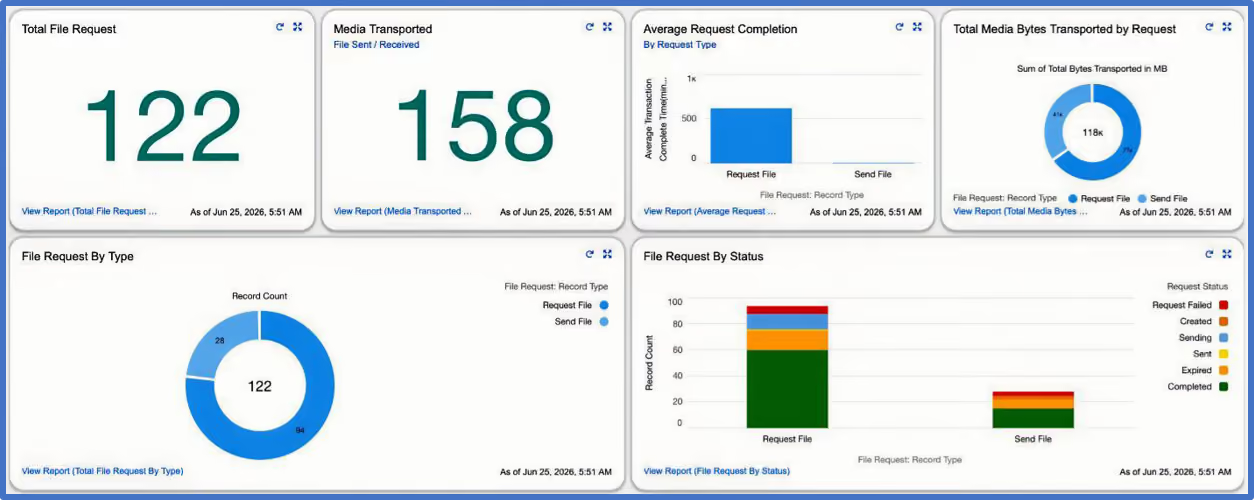
Know which documents have been requested, which have arrived, and what activity has taken place. Secure File Transport provides request statuses, file activity records, and reporting inside Salesforce. Your team can monitor outstanding requests, review transfer history, and maintain the information needed for operational reviews and audits.
- Monitor file requests from sending through receipt and completion
- Review recorded access and transfer events, including available user and timestamp details
- Track file activity, outstanding requests, and document collection progress
Real Results from Secure Document Exchange in Salesforce
86%Shorter Claim-Preparation Turnaround
A commercial auto claims project reduced the time needed to prepare claims for adjuster review from 7 days to just 1 day using secure document collection and automated workflows.
SimplifiedFinancial Document Collection
Our client, Sage Creek Capital, uses Secure File Transport alongside credit and business verification solutions to collect financial documents as part of its underwriting process.
SecureBorrower Document Exchange
Our client, Rock Solid Funding uses encrypted document exchange within Salesforce to replace manual, paper-based steps with connected digital lending workflows.
ReduceLost or Misplaced Documents
Based on average results across our customer implementations, keeping every file exchange inside Salesforce removes the chaos of email threads and shared drives, reducing document-loss issues by more than half.
Why Teams Choose Our Secure File Transport Solution
Works with Your Existing Document Workflows
Send and collect documents as part of your existing Salesforce processes. Keep file requests, received documents, and related activities connected to customer records.
Keeps Your Team Productive
Make it easier for customers and partners to share documents without creating accounts or installing software. Spend less time helping recipients access files and more time completing important tasks.
Fewer Delays in Document Collection
Avoid repeated emails and follow-up calls when documents are missing. Automated reminders and simple upload links help customers submit outstanding files and keep business processes moving.
Gives You Control Over How Files Move
Decide how and when recipients can access confidential files. Use two-factor authentication, link expiration dates, and activity tracking to manage document access and maintain better visibility.
Reduces Exposure From “Shadow File Sharing”
Teams no longer resort to personal email, shared drives, or unsecured links. Sensitive documents finally stay inside one secure file exchange environment built for compliance.
Supports Faster Customer Onboarding and Approvals
Collect ID, financial statements, contracts, and other documents through secure links. Keep information organized in Salesforce for easy review and move applications or approvals forward with fewer delays.
Learn. Build. Grow.


Frequently Asked Questions
What types of files can be securely exchanged?
Secure File Transport securely transfers all standard and custom file types, including PDFs, Word documents, Excel spreadsheets, images, videos, and ZIP archives. Users can upload multiple files at once, making it easy to collect documents securely within Salesforce. File size limits and supported formats may vary by configuration.
How are files protected during transfer?
Secure File Transport protects sensitive documents using AES-256 encryption for stored files and TLS 1.2+ for data in transit. Additional security controls include two-factor authentication, role-based access, secure file links, and configurable expiration dates.
These safeguards help protect confidential information throughout the file exchange process.
How quickly are files transferred?
Secure File Transport enables file uploads and downloads through encrypted connections, with transfer times depending on file size and network speed. Users can monitor transfer progress and receive completion updates directly in Salesforce. File request statuses and activity details are automatically updated on related Salesforce records.
Does it work with existing Salesforce workflows?
Yes, Secure File Transport integrates perfectly with the use of existing Salesforce automation tools like Flows, Triggers and Apex automations.
Can I control who accesses the files?
Yes, you can. Role-based access control means that admins can set a full list of the possible access privileges relating to records including file access, expiry dates on files, and one-time or multiple download privileges.
- Define the access via role, territory, record type or custom object
- Track access counts for every file and immediately revoke privileges if required
- Maintain GDPR compliant file transfer records for audits
Does Secure File Transport support GDPR-compliant file transfer and HIPAA requirements?
Yes, our Secure File Transport solution provides encryption, access controls, audit information, and configurable document workflows that may support organizations with GDPR and HIPAA obligations. Overall compliance depends on the organization's implementation, data-processing arrangements, security policies, and applicable legal requirements.
Can I request several documents in one secure exchange?
Yes. Secure File Transport supports individual file requests and grouped exchanges involving multiple documents. For example, a lender can request identification, bank statements, and income documents as part of a single collection process.
How much does Secure File Transport cost in Salesforce?
Secure File Transport offers two pricing options: P1 File Requests at $15 per user/month and P2 Container at $25 per user/month, both with a minimum of 10 users. A $2,500 one-time setup fee covers installation, configuration, automated workflows, templates, white labeling, documentation, and training.
Additional transaction fees apply based on usage. Contact our team for detailed pricing and to choose the right option for your business.
How long does it take to set up Secure File Transport in Salesforce?
Our secure file transfer solution can be deployed in as little as 48 hours. Our guided setup includes installing the app from Salesforce AppExchange, configuring file request templates, connecting your Botdoc account, setting up workflows, testing, and user training.
Custom configurations or advanced P2 Container implementations may require additional time.
Does Secure File Transport offer a free trial?
Yes. Secure File Transport offers a 15-day free trial, allowing businesses to explore our secure file transfer solution for document sharing & requests, automated workflows, and Salesforce integration capabilities before subscribing. Contact our team for assistance with trial setup and configuration.